Frames
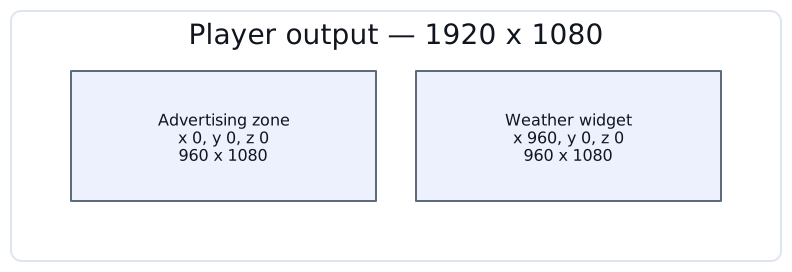
A frame is a rectangular content zone inside a player’s output. Each frame plays its own content, so one physical display can run an advertising zone, a weather widget and a news ticker at once.
Frames are also what screens are built from: a simple screen is a single frame, and a video wall combines several.
A frame is a rectangle in the output
A frame is placed by its top-left corner and sized in pixels, in the coordinate system of the player’s own resolution.
| Property | Unit | Description |
|---|---|---|
X |
Pixels |
Offset of the frame’s left edge from the left edge of the output. |
Y |
Pixels |
Offset of the frame’s top edge from the top edge of the output. |
Z |
Index |
Layering order for frames that overlap. A frame with a higher Z is drawn over one with a lower Z. |
Width |
Pixels |
Horizontal size of the frame. At least 1. |
Height |
Pixels |
Vertical size of the frame. At least 1. |
Frames do not have to tile the output neatly. They may leave gaps, and they may overlap — which is what Z is for. New frames start at Z 0, so give the frame that should sit on top a higher value.
| A player always keeps at least one frame. When you create a player, CS Play adds a frame that fills the whole output and plays independently. |
Adding a frame
-
Go to Players, open the player and switch to the Frames tab.
-
Click Add frame and give the frame a name.
-
Set the geometry, either by typing into the X, Y, Z, Width and Height fields or by dragging the frame’s handles in the preview above them.
-
Click Save frame.
| Values are applied as soon as you leave a field, so tab out of it — or click elsewhere — before checking the preview. |
The preview mirrors the fields in both directions: resizing a frame there writes the numbers back into the form.
Playback type
Playback type decides whose clock the frame runs on.
- Independent
-
The frame times its own playback. Every frame of a simple screen is independent.
- Dependent
-
The frame follows another one, chosen in Main frame, so both change content at the same instant. This is how a video wall stays aligned.
A dependent frame also gets the Independent playback when out of sync checkbox, cleared by default. Leave it cleared and the frame waits for its main frame rather than drifting; select it and the frame keeps playing on its own when the timing signal is lost.
An independent frame instead gets an Effects setting, which selects a schedule of visual effects — how media is fitted into the frame and how one item transitions into the next. That is presentation, not timing: it does not decide when content changes.
Media size and the frame
Media does not have to match the frame exactly. The effects schedule decides how a mismatch is resolved — the media can be fitted inside the frame, cropped to fill it, stretched to its edges or left at its original size, aligned to a corner, an edge or the centre. By default it is fitted and centred.
| Authoring media at the frame’s own resolution still gives the best result, because nothing has to be rescaled at playback. |
Copying a layout between players
A whole frame layout can be copied from another player.
-
On the Frames tab, click Copy layout.
-
Pick the source player.
-
Click Copy.
| Copying replaces the frames of the target player. The existing layout is not merged or kept. |
The two players must have the same resolution. If they do not, CS Play reports that the player sizes do not match and copies nothing — frame geometry is never rescaled between resolutions.
Assigning criteria to frames
Criteria are targeting tags, and they can be attached to an individual frame rather than to the whole player.
-
On the Frames tab, select the frame.
-
Click Add criteria and choose the criteria.
-
Click Add, then Save frame.
See Targeting Criteria for how criteria are created and used in campaigns.
Removing a frame
Select the frame on the Frames tab and click Remove frame.
Deletion is refused while the frame is still doing a job. CS Play checks, in order, whether:
-
it is the player’s last frame — a player cannot be left with none;
-
other frames are synchronized to it as their main frame;
-
it belongs to an active composite screen;
-
campaigns are targeted at it — the refusal names them, so you know what to change.
Clear whichever of these applies and remove the frame again.