Video Walls (Composite Screens)
A composite screen is a video wall: several physical panels arranged in a grid so that together they show one large picture. Each panel runs its own player, one of them keeps time for the rest, and the creative reaches each panel as a file of its own.
What a video wall is made of
A composite screen combines frames — one frame per panel. The frames may belong to different players, and each of them carries three things:
-
A grid position: a row and a column.
-
A flag marking exactly one frame as the primary one. Its player keeps time; the rest follow it.
-
Content for that position — its own media file.
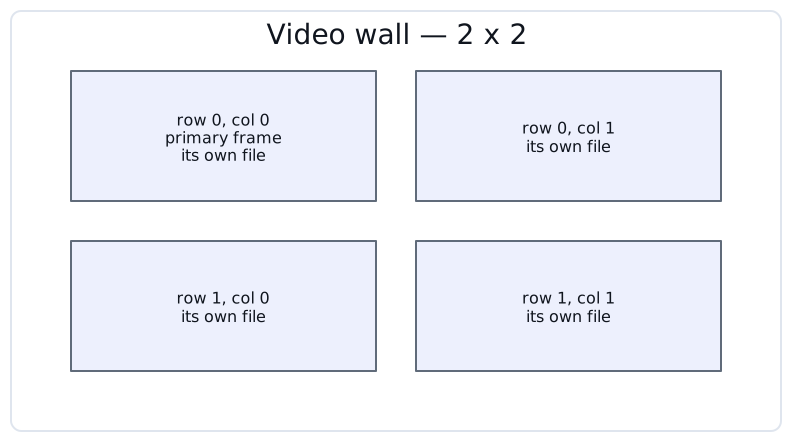
| CS Play does not cut one big picture into panels. An advertisement carries a separate media file for every grid position, and the advertiser uploads them as a set. |
Rows and columns are numbered from zero, so the top-left panel sits at row 0, column 0. You never type these numbers — you arrange the panels by dragging them, and CS Play derives the addresses from where they land.
Creating a composite screen
Open Screens and click Composite screen. The whole screen is defined on one form.
-
Enter a Name, and a GID if you match screens against an external system.
-
Click Add frames and select the frames the wall is made of.
-
Under Frame positions, drag the tiles until their arrangement matches the physical panels.
-
Click the flag on one tile — Set as Primary — to nominate the primary frame.
-
Save the screen.
| Saving configures the players for you. CS Play sets the primary frame’s playback type to Independent, sets every other frame of the screen to Dependent, and points each of them at the primary frame. You do not have to set this up player by player. |
Primary and dependent frames
The result is visible in the frame settings of each player, under Playback type:
| Setting | Meaning |
|---|---|
Independent |
The frame decides its own playback timing. Every simple screen is independent, and so is the primary frame of a video wall. |
Dependent |
The frame follows another one, named in Main frame. All non-primary frames of a video wall are dependent. |
The primary frame is the clock source. It decides when a spot starts and ends, so that transitions happen at the same instant across the whole wall.
| The industry also calls these master and slave frames. CS Play uses "primary" and "dependent" in the interface. |
Synchronization runs between the players
CS Play hands every player of the wall the network addresses of the others: a dependent player learns the address of the primary, and the primary learns the addresses of its dependents. The timing signal then travels directly between them over the local network — it does not pass through the cloud.

| The panels of a video wall must be able to reach each other over the network. If they sit in isolated subnets, or a firewall stands between them, they will not hold sync no matter how healthy each player’s connection to CS Play is. |
When a panel loses sync
Each dependent frame has an Independent playback when out of sync checkbox in its player’s frame settings. It is cleared by default, and it appears only for frames whose playback type is Dependent.
-
Cleared — the panel waits for the primary frame and does not play on its own. Perfect alignment is preserved at the price of a panel that may show nothing.
-
Selected — the panel keeps playing its own content instead of waiting. The wall stays lit, but the panel may drift out of step with its neighbours.
| Select it where an unbroken picture matters more than exact alignment — a public space in which a dark panel is unacceptable. |
Content for a video wall
An advertisement targeted at a composite screen carries one media file per grid position. Each file is matched against the resolution of the frame standing at that position, so a wall of panels with different resolutions needs parts cut to different sizes.
The set of parts is bound to the layout of the whole grid — every frame’s row, column, width and height.
|
Changing the layout invalidates the parts already uploaded. Moving a panel, swapping a player for one with a different resolution, or adding and removing panels all change the layout, and creative uploaded for the previous layout no longer applies to the new one. Treat a change to the wall as a change to its content, and plan for re-uploading the parts. |
| Video walls require a current version of the player application. A player on an older version receives no composite content. |
Differences from simple screens
| Feature | Simple screen | Composite screen |
|---|---|---|
Physical panels |
One |
Several, arranged in a grid |
Frames per screen |
Exactly one |
One per panel, possibly across several players |
Playback timing |
Independent |
One primary frame, the rest dependent on it |
Content |
One media file |
One media file per grid position |
Grid addressing |
Not used |
Row and column per frame, numbered from zero |
Network requirement |
Reach CS Play |
Reach CS Play and each other |