Private-Deal Delivery
Every private-deal ad play in CityScreen Context starts with the content management system asking a question about one face at one moment in its classic slot, and ends with that same system reporting what actually happened. This page follows that round trip.
It is for the organization’s owner, admin and manager employees who need to understand what the platform can tell them about a delivery. Nothing on this page is done from the interface: private-deal delivery is entirely machine to machine.
The live request
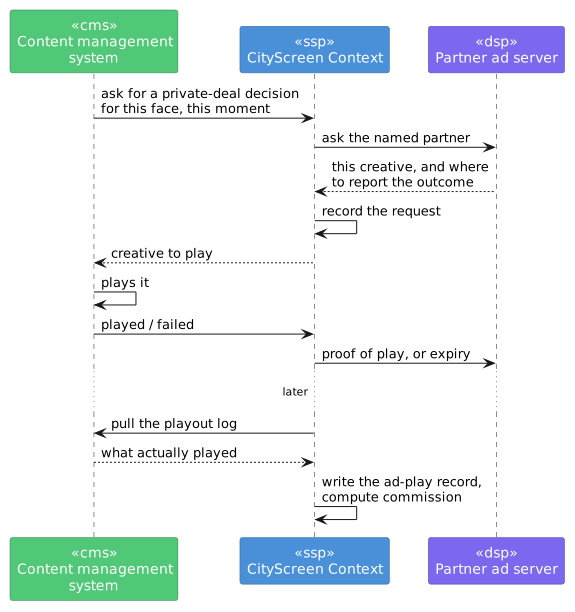
The content management system asks CS Context for a decision about one face at one moment. CS Context asks the one named partner, and either gets back a creative to play or nothing at all. Having nothing to serve, or being unreachable, is a normal outcome for the partner, and the slot falls back to its configured action — skip, or a fallback advertisement.
When a creative does come back, the content management system reports afterward whether it actually played. See "The report window" and "Reconciling what actually played" below for what happens next, and how the platform double-checks itself.
The report window
Some partners attach a deadline to a decision: report by this time or the opportunity is void. CS Context stores that deadline on the request and honors it.
A success reported after the deadline has passed does not become a success. The request is marked failed instead, and no proof of play is sent to the partner.
A request whose deadline passes with no report at all is marked failed, and the partner is told.
Reconciling what actually played
The outcome reports above move a request along and tell the partner. CS Context also pulls the playout log regularly from each organization’s content management system for every partner that carries private deals.
The pulled log is the authority for what is recorded: it produces the ad-play record with its face, its campaign, its audience figures and its commission.
Because of this, a private-deal ad play appears in reporting shortly after it happened.
Creatives arrive from the partner
The partner returns a creative from its own library, and CS Context works out which of its own advertisements that corresponds to.
When it recognizes the creative, the decision proceeds and the advertisement is served.
When it does not — the first time a given creative is chosen for this organization — CS Context imports it: a campaign is created in the confirmed state, carrying the partner’s own creative identifier, and the creative file is fetched. The opportunity that triggered the import is not filled, and the partner is told so. From the next opportunity onward the creative is recognized and served normally.
CS Context also imports each partner’s creatives ahead of time, so that in steady operation the first-sighting case is rare. It asks the content management system which slots are reservable, then asks the partner what it holds for those faces and durations, and imports what is new.
| Creatives arriving this way do not produce a moderation request and are not put to your moderators. If your organization’s rule is that a human sees every creative before it runs, that rule does not apply to private deals. See Creative approval. |
What differs by partner
Both partners are asked the same question in the same way. What differs is how each recognizes the face, how long it allows, and what it hands back.
| HiveStack | Vistar | |
|---|---|---|
How the face is identified |
The screen ID recorded on the face. A face with no screen ID produces an error and no decision. |
The face’s GID, used as the device, venue and display-area identifier at once. |
How the report window is set |
One hour from the decision, fixed. |
The lease expiry the partner returns with the creative, which varies per decision. |
What comes back with the confirmation |
Nothing beyond acknowledgement. |
The media cost of the play, and the partner’s own deal identifier. |
Connection settings |
The partner’s web address and credential, per organization. |
The partner’s web address, credential, and the network identifier the partner issued you. |
The platform shows no media price for a private deal. The only money figure it shows is its own commission. See Reporting.
| Record each face’s identifier carefully. The partner delivers to the screen the identifier names, so a screen ID recorded against the wrong face sends that partner’s ad to a screen other than the one the partner believes it bought, and both systems record the play as a success. Comparing the two systems' figures face by face confirms the match. |
Reserve playlists
Statistics can show a second delivery type, reserve, for plays from a reserve playlist: a fixed sequence of creatives with a date range and time-of-day windows, attached to a set of faces, which the content management system plays directly. Deliveries are recorded against it after the fact, exactly as they are for live requests, and the private-deal statistics distinguish the two.
If you are considering this delivery shape for a partner, raise it with us before designing around it.