Activation and Archiving
A face is either offered for sale or it is not. That is what activation means here, and for most operators it is decided by the content management system.
This page is for owner employees, who are the organization role the platform accepts activation changes from. Admin and manager employees can archive a face; every employee role can see the states.
What being disabled changes
Disabling a face withdraws it from sale. Concretely:
-
It disappears from the catalog CityScreen Context publishes to demand partners, which lists only faces that are enabled and not archived, in organizations that are themselves enabled.
-
An ad request naming that face is refused with a bad-request response, so nothing is bought on it and nothing plays through the platform on it.
-
Its automated guaranteed and programmatic guaranteed reservations, its price lists, its prices, its past ad plays and its reports all remain exactly as they were.
Nothing is deleted, and re-enabling puts the face back on sale immediately.
Who decides it
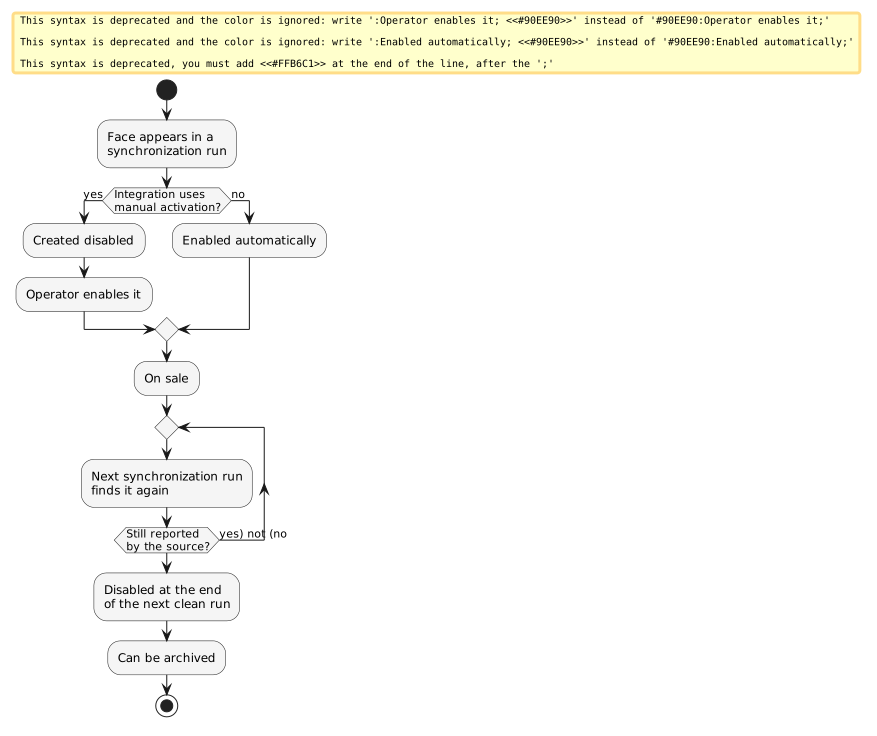
For most integrations, the source does.
- Present in the source
-
A face the latest synchronization run found is enabled.
- Absent from the source
-
A face the latest complete run did not find is disabled at the end of that run. A run with a failed page skips this step entirely — see Synchronization.
That is the whole mechanism on the CS Play pull, the spreadsheet import, SpinetiX and exchange-sourced inventory. On those integrations the activation controls are not offered. To take a face off sale, take it out of the source catalog.
Manual activation
One integration works differently. CubicVision declares that activation is manual, and for organizations on it:
-
a newly discovered face arrives disabled and stays that way until someone enables it;
-
a synchronization run leaves existing faces as they are, so an operator’s decision survives the run;
-
the activation controls appear on the inventory list and on each face’s detail page.
This is a property of the integration, not a setting an organization can turn on for itself.
Turning faces on and off
Where manual activation applies, faces are selected on the inventory list — individually or all at once — and activated or deactivated in bulk. A single face can also be toggled from its own detail page. Archived faces are not selectable.
Deactivation checks for commitments before it proceeds. If any of the selected faces is targeted by a campaign in the new or confirmed state, the platform lists the impacted campaigns and changes nothing until you confirm the warning. Confirming the warning carries out the deactivation.
Blacklist targeting counts too: a campaign that excludes some faces but not all of the selected ones is treated as targeting them.
Every activation change is written to the organization’s audit log against the face.
Archiving
Archiving is the way to get a face out of the working list without losing it.
-
A face must be disabled before it can be archived. An enabled face cannot be archived.
-
Archived faces are hidden from the inventory list by default and are found by switching the archive filter.
-
An archived face is excluded from the catalog published to demand partners.
-
Its detail page loses the save action, and the format and camera controls are disabled.
-
Owner, admin and manager employees can archive.
Archiving is one-way: a face comes back only when the source reports it again.
Archiving and the source
An archived face stays archived while the source does not report it. A face the source still reports returns to the inventory list at the next synchronization run: enabled on most integrations, and still disabled on CubicVision. To keep a face off sale on CubicVision, deactivate it.
Related
-
Synchronization — how a run decides what is present and what has gone.
-
What you can edit — the settings a disabled or archived face keeps.
-
Campaigns — what the impacted-campaign warning is protecting.