Creative Approval
CityScreen Context sells airtime automatically. Without a review step, a demand partner could put anything on an operator’s screens the moment it won a bid. Creative approval is where an employee of the selling organization decides whether a submitted creative is allowed to air, and on which faces.
This section is for the employees who do that work — owners, admins, managers and moderators — and for integrators who need to know what the platform does with a creative once it is approved.
Two parallel flows
CityScreen Context has two review queues, moderation requests and layouts, and they are separate all the way through. Which one a creative lands in is decided by the demand partner’s integration. Establish which flow you are in first, because each one is followed on its own.
| Moderation request flow | Layout flow | |
|---|---|---|
What arrives |
A creative bound to a submission the demand partner intends to bid with |
A creative on its own, submitted through the automated guaranteed path |
The record created |
A moderation request, carrying the creative, its intended scope and the review state |
A creative, reviewed in its own right — the interface calls it a layout |
Where you review it |
The Requests screen |
The Layouts screen |
States |
|
|
Can you restrict it to particular faces? |
Yes, as part of the review |
No |
Pushed to the content management system on approval? |
Yes, for some integrations |
No |
Where it goes next |
Becomes a campaign that can win auctions |
Gets bound to an automated guaranteed advertisement |
Whether the push to the content management system happens at all depends on which system runs the operator’s screens. Most integrations receive it automatically as part of approval; a few manage delivery through their own path instead — see supported partners for which. Where it does happen, nothing further is needed: the creative reaches the operator’s screens as part of approving it.
A creative on the automated guaranteed path appears on the Layouts screen only, and a creative on the moderation-request path appears on the Requests screen only.
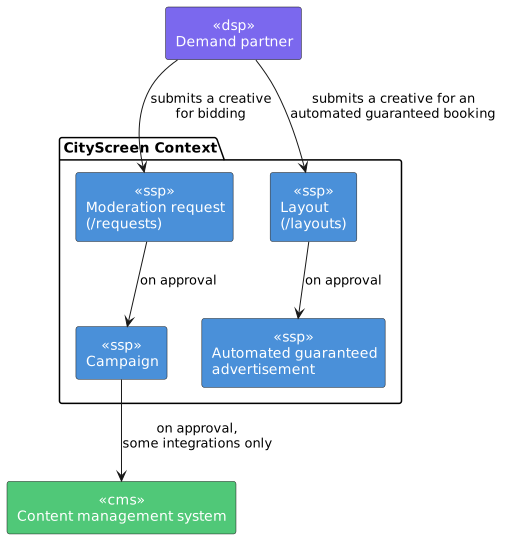
The moderation request flow
A demand partner that intends to bid submits its creative ahead of time, so that a decision has already been made by the time an opportunity comes up.
The platform stores it as a moderation request in state NEW and notifies the organization.
An employee opens the request, looks at the creative, and approves or rejects it. Approving creates a campaign and its advertisements, which is what makes the creative eligible to win. Rejecting sends the reason back to the demand partner. Both outcomes are final — see creative states.
Two things about this flow are worth knowing before you start reviewing:
-
Approval can be scoped to particular faces, as an allow list or a block list. The demand partner is told which faces it won on approval.
-
If the organization has defined employee positions, every position must record its own verdict before the request is decided.
The layout flow
A demand partner booking automated guaranteed airtime submits its creatives separately from its campaigns, and each one is reviewed as a creative in its own right.
The interface calls these layouts, and they live at /layouts.
A layout has a third outcome: an employee can send it back for review, which asks the demand partner for a correction without rejecting it outright. An automated guaranteed advertisement cannot be confirmed until every layout attached to it is confirmed.
See automated guaranteed campaigns for how a confirmed layout is then used.
What both flows share
- Positions
-
Employee positions — legal, brand safety, and so on — route review in both flows. Every position defined by the organization records its own verdict, and the outcome is the combination of them. See positions.
- Automatic approval
-
An organization can name demand partners whose creatives are confirmed the instant they arrive, with no human review at all, in either flow. See automatic approval.
- Previews
-
A preview is generated for every media file as soon as it arrives, so a reviewer does not have to open the raw file.
- Roles
-
Reviewing is open to the owner, admin, manager and moderator roles. A viewer can see the queues but cannot act. See employees and roles.
Technical requirements
An organization can publish what it will accept — resolutions, formats, durations — as text and attached documents. The text is written for people, and the reviewer applies it by comparing the creative with it.
See technical requirements for what is published and how they are enforced.
In this section
-
Reviewing creatives — the task, in both flows
-
Creative states — both state machines, with triggers
-
Automatic approval — skipping human review for a named demand partner
-
Rejection and resubmission — how a rejection travels, and what a resend resets