Positions
A position is a review responsibility. An organization defines its own — legal, brand safety, sales, whatever the business needs — and a moderation request is then put to every one of them.
This page is for the owner and the admin, who are the two roles that create positions and decide who sits in them. Managers and moderators are the people who end up in them; Creative approval describes the review work itself.
What a position is
A position grants no permission. What an employee may do comes from their role. A moderator in the "legal" position and a moderator in no position at all can do the same things, except that the second one is never asked to review anything.
A position is a review responsibility and carries no job title. Two positions called "Senior" and "Junior" produce two independent verdicts on every creative.
Every position votes on every moderation request the organization receives. To let two people split the load, put them both in the same position.
Who can hold one
Only managers and moderators.
Owners, admins and viewers cannot be members of a position. The employee form offers the positions field when the role is manager or moderator.
Owners and admins do not need membership, because they can record a verdict on behalf of any position the organization has. Viewers take no part in review at all.
How positions decide a moderation request
The rule depends on whether the organization has defined any positions.
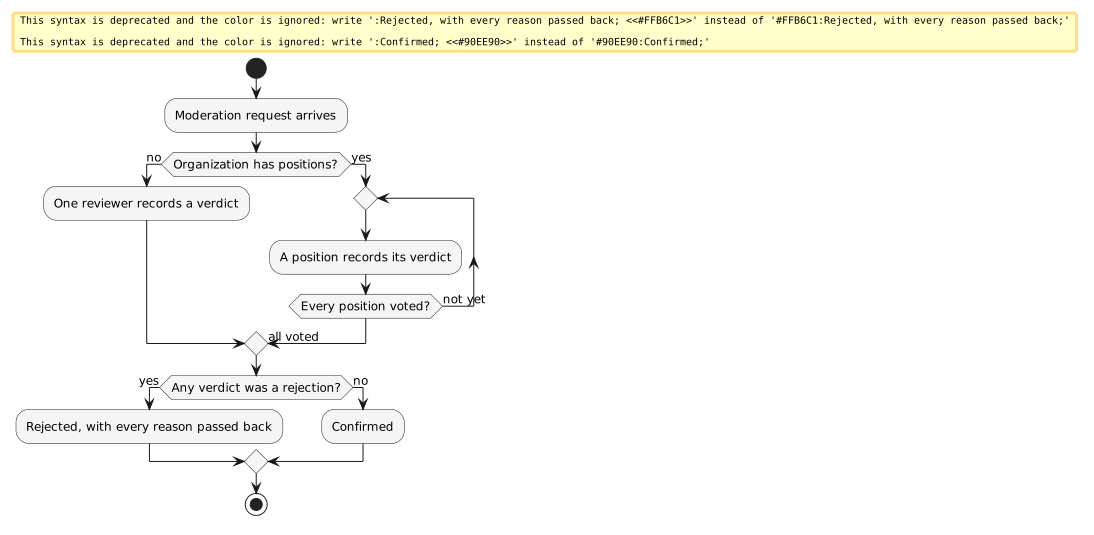
With no positions defined
A single reviewer decides. Whoever gets there first — owner, admin, manager or moderator — confirms or rejects the request and that is the outcome.
This is the right shape for a small operator where one person handles all creative review.
With positions defined
Every position the organization has defined records its own verdict, and the request stays open until they all have.
-
Any single rejection rejects the request. Once the last position has voted, the request is confirmed only if no position rejected it.
-
Every decline reason is passed back together. If two positions rejected with different reasons, the demand partner receives both.
-
A reviewer must name the position they are speaking for. With positions defined, a verdict with no position attached is refused.
-
Managers and moderators may only speak for a position they belong to. Owners and admins may speak for any position.
-
A verdict can be revised while the request is still open. Recording a second verdict for the same position replaces the first. Once the request has settled, it cannot be reviewed again.
The same tally governs individual creatives, including the layouts submitted on the automated guaranteed path: every position records a verdict, and the creative settles only when they all have. See Reviewing creatives.
Choosing how many to define
Every position you define is another verdict that has to be collected before anything can go to air. Three positions means three people have to act on every creative that arrives, and the slowest of them sets the pace.
Define a position for each genuinely separate sign-off your business requires, and no more. If the answer is "one person checks everything", define none at all and let the single-reviewer rule apply.
Creating and managing positions
Available to the owner and to an admin.
-
Go to Positions.
-
Add a position and give it a name.
-
Save.
-
Open the position’s Employees tab, choose Change, and select the managers and moderators who belong to it.
-
Save.
Renaming a position is done in place, by editing its name at the top of the position. A rename does not disturb verdicts already recorded.
Creating, renaming and deleting a position is written to the audit log, and so is every change to its membership — added and removed employees are both recorded by name.
You can also assign positions from the other direction, on the employee’s own record. See Employees and roles.
Deleting a position
Deleting a position is available to the owner and to an admin, and it is the one operation on this page that needs care.
Verdicts already recorded by the position are kept, and keep showing the position’s name, so the history of a settled request stays readable.
| Delete a position only when no moderation request is waiting for a decision. Let the outstanding requests settle first, then delete the position. |
If you need to stop using a position but requests are outstanding, empty its membership and leave the position in place until the queue is clear.
Read next
-
Creative approval — the review work itself, from the reviewer’s side.
-
Employees and roles — who can be put in a position.
-
Notifications — how reviewers learn there is something waiting.