Roles and access
Access in CityScreen Context is decided on two axes at once, and they are independent of each other.
The first says which side of the product an account sees: the platform-wide administrator role, or an ordinary user. The second applies only to ordinary users and says what they may do inside their own organization.
This page is for anyone deciding who to give an account to, and for anyone wondering why a screen they were told about is not there.
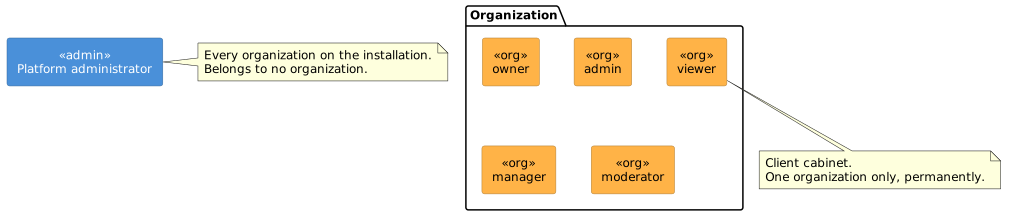
Axis one: administrator or user
Every login carries one of two platform roles.
- Platform administrator
-
The operator of the installation. Provisions organizations, switches them on and off, registers the demand partners organizations may then enable for themselves, sets the platform’s commission, and can read any organization’s data. A platform administrator belongs to no organization.
- User
-
Everyone else. Sees the client cabinet and works inside one organization. What they may do there is decided by their employee role, below.
One account is never both. An organization is created either by the platform administrator or through a handshake started by the operator’s own content management system, and an organization’s first employee is created for it. See Organization setup.
One login, one organization, permanently
A login belongs to at most one organization.
For the reader, that means:
-
A person who works with two organizations on the same installation needs two accounts with two different email addresses. Email addresses are unique across the installation, so the same address cannot serve both.
-
To move someone to another organization, create an account for them in the new organization.
-
An agency or a holding company with several organizations on the installation manages each one with its own accounts.
Axis two: the five employee roles
Every employee has exactly one of five roles: owner, admin, manager, moderator, viewer.
An organization’s admin is a different role from the platform administrator. A moderator is the role dedicated to reviewing creatives, and it is the one role without access to the audit log.
| Can do | owner | admin | manager | moderator | viewer |
|---|---|---|---|---|---|
Create and edit employees, assign their roles |
yes |
yes 1 |
|||
Create and edit review positions, assign employees to them |
yes |
yes |
|||
Create and edit legal entities, attach inventory and employees to them |
yes |
yes |
|||
Change organization settings and the organization profile |
yes |
yes |
|||
Set up the connection to the content management system and start a sync by hand |
yes |
yes |
|||
Reissue the organization’s access token |
yes |
yes |
|||
Enable and disable demand partners for the organization |
yes |
yes |
yes |
||
Create and edit price lists, floor prices and automated guaranteed price lists |
yes |
yes |
yes |
read only |
|
Edit a face — format, camera flag, screen ID, legal entity — and archive it |
yes |
yes |
yes |
||
Import inventory from a file |
yes |
yes |
yes |
||
Switch faces on and off in bulk, where the integration allows it |
yes 2 |
||||
Publish technical requirements |
yes |
yes |
yes |
yes |
read only |
Review creatives and decide moderation requests |
yes |
yes |
yes |
yes |
|
Decline a campaign, change a campaign’s inventory targeting |
yes |
yes |
yes |
yes |
|
Accept, counter or reject a programmatic guaranteed campaign |
yes |
yes |
yes |
yes |
|
Move an automated guaranteed campaign or advertisement through its states |
yes |
yes |
yes |
read only |
|
Replace a photo capture |
yes |
yes |
yes |
yes |
|
Read the audit log |
yes |
yes |
yes |
||
Receive in-app notifications |
yes |
yes |
yes |
yes |
|
Generate and download reports |
yes |
yes |
yes |
yes |
yes |
Read the organization’s inventory, campaigns, prices and statistics |
yes |
yes |
yes |
yes |
yes |
1 An organization’s admin can manage every employee except the owner.
2 Bulk activation is offered to the owner alone.
It is also only available at all for integrations where face activation is not driven entirely by the source system.
The table shows what each role can do. Employees and roles describes creating and editing employees in practice.
Positions and legal entities
- Positions are review responsibilities
-
A position — legal, brand safety, whatever the organization defines — routes creative review. A moderation request is put to every position the organization has defined and each records its own verdict. A position grants nothing on its own; what an employee may do still comes from the role. Owners and viewers do not carry positions. See Positions.
- A viewer can be narrowed to one legal entity
-
Of the five roles, the viewer is the only one that can be attached to a single legal entity. Attaching one narrows what inventory that viewer sees to that entity’s, and takes them out of in-app notifications. See Organization setup.
The owner is singular, and only the operator can move it
An organization has exactly one owner, and it must have one from the moment it is created.
Only the platform administrator can make a different employee the owner, and the previous owner becomes a viewer in the same operation. Both changes are written to the audit log. The platform administrator confirms who is asking before changing an owner.
An employee cannot change their own role or disable their own account.
Read next
-
Employees and roles — creating and editing employees in practice.
-
Administration — the organization as an administrative object.
-
Audit — what is recorded.