Campaign states
An auction campaign holds one of five states. Four of them appear in the client cabinet as tabs on the campaign list; the fifth exists only while a newly approved creative is on its way to the content management system.
This page is for the owner, admin, manager and moderator employees who work the campaign list, and for the admin who sets the idle thresholds. It applies to ordinary auction campaigns. Automated guaranteed campaigns have their own, longer lifecycle — see Automated guaranteed campaign states.
The five states
| State | What it means | Listed in the cabinet |
|---|---|---|
New |
Approved in review, waiting to be accepted by the content management system |
No |
Confirmed |
Live and selling |
Yes — the default tab |
Paused |
Paused automatically after a long time without sales |
Yes |
Rejected |
Refused, by an employee here or by the content management system |
Yes |
Inactive |
Retired automatically after a long pause or rejection |
Yes |
A buyer whose campaign is rejected or inactive submits the creative again, which produces a new moderation request and a new campaign.
Transitions
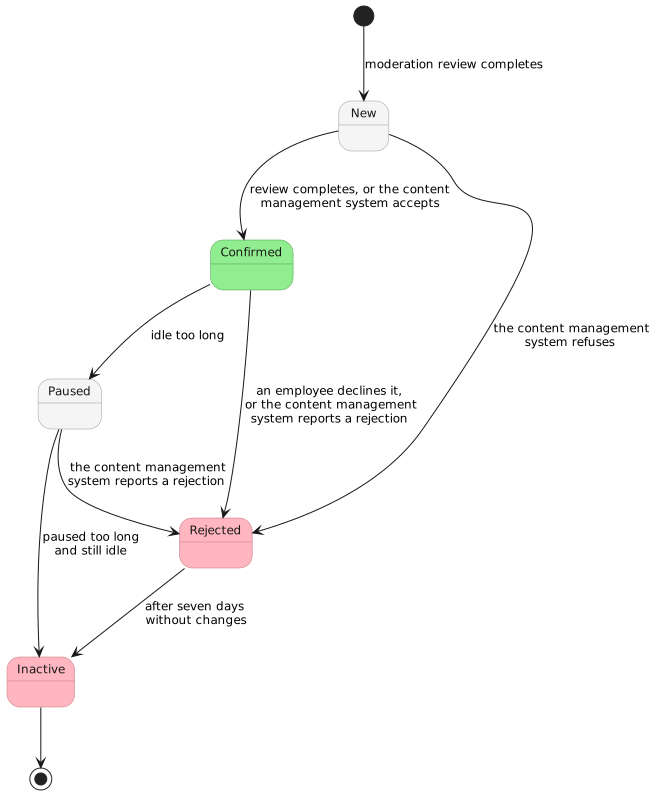
| From | To | What causes it |
|---|---|---|
— |
New |
The moderation request for this creative is confirmed by every employee position the organization has defined, and the platform creates the campaign. |
New |
Confirmed |
Either review completing, or the content management system acknowledging the creative — which of the two applies is a property of the content management system your organization runs. |
New |
Rejected |
Review resolves to rejected, or the content management system refuses the creative. |
Confirmed |
Rejected |
An employee declines the campaign, giving a reason. The reason is sent back to the demand partner and the employee is recorded against the campaign. |
Confirmed or Paused |
Rejected |
The content management system reports a rejection for a campaign that was already live. This path is not initiated by anyone in the cabinet. |
Confirmed |
Paused |
The platform finds that the campaign has not been offered to the auction for the organization’s idle threshold. See The idle thresholds. |
Paused |
Inactive |
The platform finds that the campaign has been paused for the organization’s pause threshold and is still idle. The demand partner is sent a rejection reading |
Rejected |
Inactive |
Rejected campaigns that have not been modified for seven days are retired. |
Who can change a state
A person changes a campaign’s state by declining it.
An employee holding owner, admin, manager or moderator can decline a campaign belonging to their own organization, and the campaign moves to rejected. A viewer cannot decline.
Every other transition comes from the content management system reporting back or from the automatic pause and stop described below.
The idle thresholds
Two per-organization settings drive the automatic pause and the automatic stop. Both are counted in days, and both are edited by an owner or admin employee of the organization, under the organization’s settings.
| Setting | Default | Lowest accepted | What it does |
|---|---|---|---|
Days idle before a campaign is paused |
30 |
7 |
A confirmed campaign that has not been offered to the auction for this many days is moved to paused. |
Days paused before a campaign is stopped |
180 |
180 |
A paused campaign that has been paused for this many days, and is still idle, is moved to inactive. |
The stop threshold can be lengthened but not shortened.
Idleness is measured from the last time the auction offered this campaign to a face. A campaign that has never been offered at all is measured from the day it was created, so a creative that is approved and then never bid on is paused on the same schedule as one that stopped selling.
The content management system has to agree
When the platform pauses or stops a campaign, it first tells the content management system to do the same with that campaign’s advertisements, and changes the campaign’s own state once the content management system has accepted. A campaign paused automatically is therefore also paused in the content management system, so its advertisements are out of the playlists there. Automatic pausing and stopping apply to integrations whose content management system supports these calls.
Stopping a campaign
To stop a campaign selling, decline it. Declining is the only action in the cabinet with that effect, and it is not reversible.
What else decides whether a campaign wins
The state decides whether the campaign is offered. Four other things decide whether it wins, and none of them shows up on the state tabs:
-
The flight window, if the demand partner supplied one — see The flight window.
-
The face list and its whitelist or blacklist mode.
-
Whether the demand partner is still in a price list that covers the face — see Price lists.
-
Whether the demand partner bids at all, and above the floor price.
A campaign in the confirmed tab that has sold nothing for a week usually owes it to one of those four.