How it works
CityScreen Context runs four flows. Everything else in the product is configuration for one of them or reporting on one of them.
| Flow | Direction | Timing |
|---|---|---|
Inventory in |
Content management system → platform |
Scheduled, hourly |
Creatives in |
Demand partner → platform → content management system |
On submission, plus scheduled polls for some integrations |
The auction |
Content management system → platform → demand partners → back |
Live, once per opportunity |
Playout facts back |
Content management system → platform |
Scheduled |
This page is for anyone who needs to know what the platform does on its own and when.
Inventory in
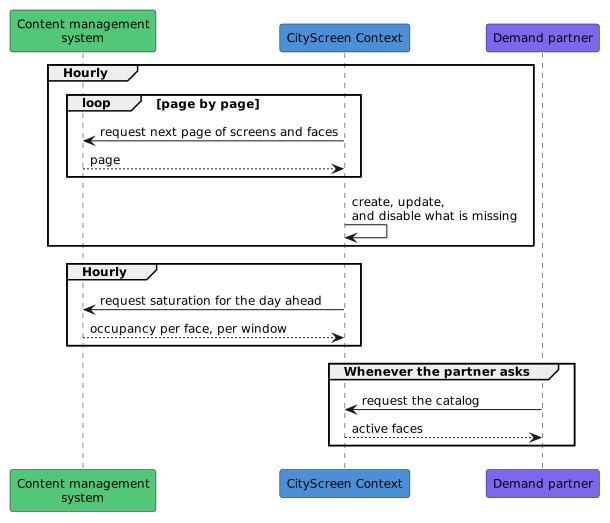
The platform does not hold a hand-typed catalog. It pulls one from the operator’s content management system and keeps it current.
-
The platform asks the content management system for the screen and face catalog every hour. An employee with the owner or admin role can also start a run by hand.
-
Screens and faces that came back are created or updated. Faces the source no longer reports are switched off and stay in the catalog. A run that does not complete switches nothing off.
-
Occupancy figures, called saturation, are pulled on the same hourly cycle.
-
Demand partners get the catalog by asking for it. The platform does not push inventory to anyone; demand partners pull the catalog themselves.
Some integrations replace the hourly pull with a spreadsheet import, and one supports switching faces on and off by hand. The details, including the four fields an operator can edit without them being overwritten, are in Synchronization and What you can edit.
Creatives in
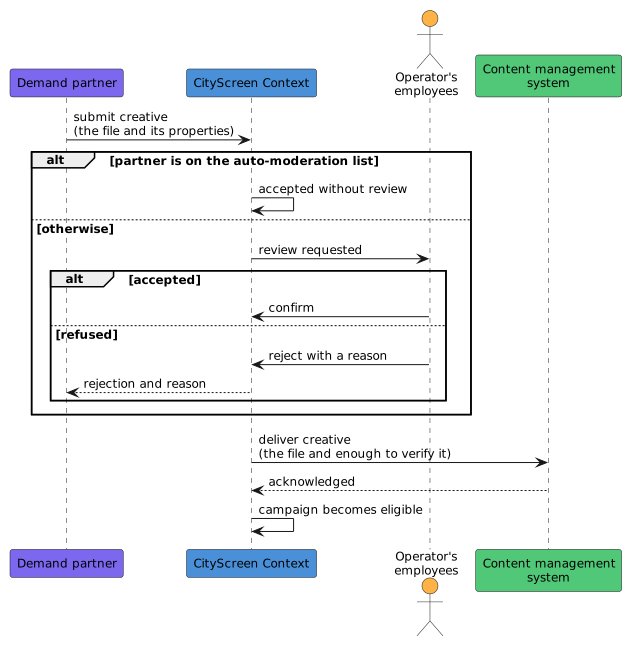
A demand partner cannot put a creative on a screen by winning an auction with it. The creative has to have been accepted first, and delivered to the content management system, before it can be played at all.
-
A demand partner submits a creative to the platform when it has one. For some integrations the platform polls the partner for new creatives on a schedule instead.
-
Unless the partner is on the organization’s auto-moderation list, the submission is reviewed by the operator’s own employees. Every review position the organization has defined records its own verdict.
-
On acceptance, the platform delivers the creative to the content management system, along with its dimensions and duration and the identifiers the platform will use when it later names this creative as a winner.
-
Once the content management system confirms it has the file, the campaign becomes eligible for the auction.
-
On rejection, the reason is passed back to the demand partner.
Creatives arriving through the automated guaranteed path follow a second, separate flow that does not create a moderation request. Both are covered in Creative approval.
The auction
This is the live path, and the only one that runs for each moment of airtime. It runs for a programmatic slot: a classic slot’s playout is decided by the content management system on its own, without asking the platform at all.
-
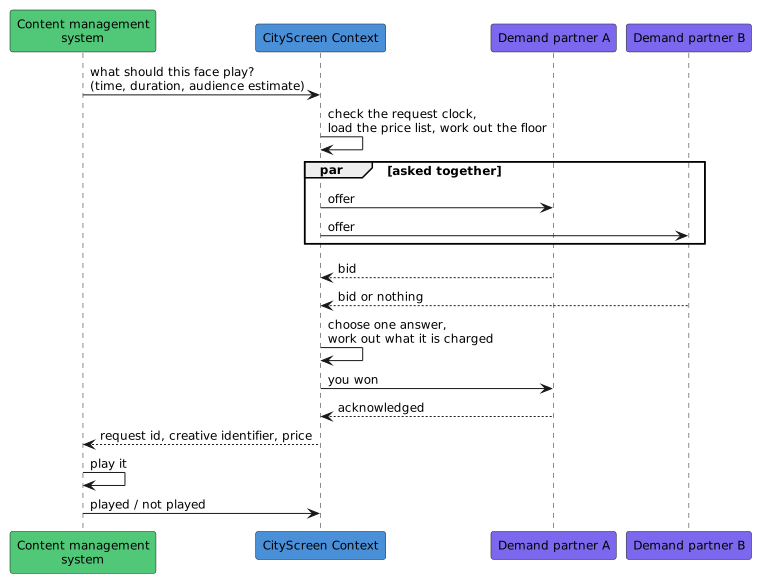
The content management system sends the platform an ad request: what should this face play, giving the playout time, the slot duration and an audience estimate. The request is authenticated with the organization’s access token.
-
A request whose timestamp is more than three minutes away from the platform’s own clock is refused.
-
The platform loads the price list covering that face, works out the floor price and offers the opportunity to the demand partners the price list names. They are all asked at the same moment.
-
Each partner has 1.5 seconds to answer, and 1.7 seconds for its whole leg including the platform’s own processing time. A partner that has not answered by then is left out of the comparison.
-
One answer is chosen and a clearing price is worked out. The auction is second price, so the winner usually pays less than it bid.
-
The winner is told it won before the platform answers the content management system. If that notice fails, the platform returns no winner.
-
The answer to the content management system carries three things: a request id, a creative identifier and a price. It never carries a file URL — the content management system already has the file, from the creative flow above.
-
The content management system reports back whether the play happened.
How the winner is chosen, what the clearing price is, and what happens when a booked campaign is in play are in The auction.
Playout facts back
The platform learns what actually ran by asking, after the fact. It does this on a regular schedule for each kind of source: ordinary auction plays, automated guaranteed campaign plays, private deal plays and exchange partner plays.
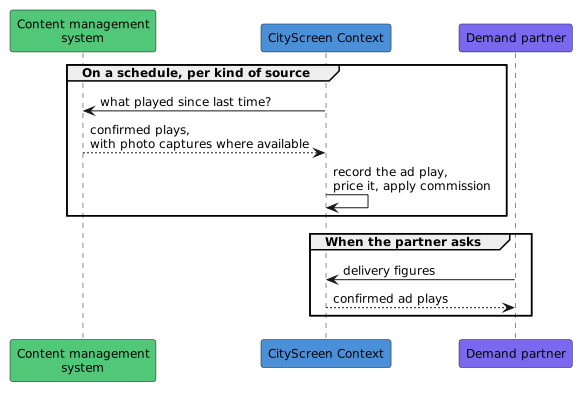
This documentation calls a confirmed playout an ad play. An impression is an audience figure and an ad play is a screen event, so where an audience estimate exists it is stored alongside the play and does not multiply the count.
An ad request that is never confirmed is closed after two hours and marked failed.
What is counted, what is not, and what a confirmation arriving after that window does are in Reporting and Late and lost plays.