Integrations
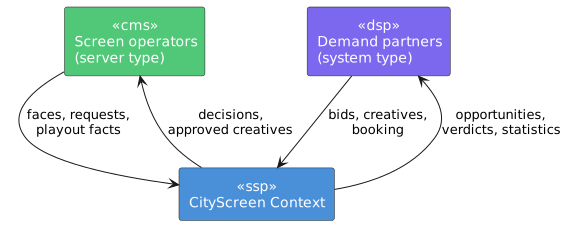
CityScreen Context sits between the systems that operate screens and the systems that buy time on them. Both sides are configurable, and the platform keeps them apart.
This section is for the owner, admin and manager employees who turn demand partners on for their own organization, and for the engineers building either side of a connection.
Two axes
Every integration question in this product resolves to one of two settings.
- System type
-
What kind of buyer a registered demand partner is. It decides whether that partner takes part in bidding at all, whether more than one account of it may exist, which protocol the platform speaks to it, and whether it can be used for private deals. This is the demand side.
- Server type
-
Which content management system or exchange operates an organization’s screens. It decides where the face catalog comes from, whether confirmed ad plays can be pulled back, whether a creative’s approval settles inside the platform, and whether a creative that names no faces gets them chosen for it. This is the supply side.
The two are set independently and read independently. They touch in two places, both named at the foot of this page.
| Every partner a price list admits is asked at the same moment, and the winner is decided by price or by arrival, depending on the price list’s mode. Registering a partner does not put it in front of another. See Waterfall mode. |
System type: what kind of buyer
A demand partner is one row in a platform-wide registry, created by the platform operator. Its system type is chosen at that moment and carries four consequences.
| The type decides | What follows |
|---|---|
Whether the partner bids |
Only a type marked as taking part in bidding can be put into an RTB price list, in auction or waterfall mode. Types that do not bid buy through their own booking protocol instead, and are never asked for a price at slot time. |
Whether more than one may exist |
Most types are limited to one registry row across the whole platform. The row is shared, but its connection details are not: every organization that enables the partner enters its own. The generic SSP type is the exception and admits as many separately named rows as there are counterparties to connect. |
Which protocol is spoken |
Some types speak the platform’s own SSP protocol. Others speak a protocol of the partner’s own, which the platform implements as an adapter. |
Whether private deals are possible |
A partner can be selected for a private deal only if its type supports one. See Private deals. |
The registry also carries the partner’s legal details. The auction is second price unless the platform administrator sets first price for a partner, platform-wide or for one organization; see How the winner is chosen.
Registering and enabling are two different acts, done by two different people. See Managing demand partners.
Server type: what runs the screens
Every organization carries exactly one server type, set when the organization is created.
Four behaviors are read directly off it.
- Where the face catalog comes from
-
Most server types pull the catalog from the operator’s system over an interface. One takes it as a file import instead, and the exchange server type draws it from the remote exchange.
- Whether confirmed ad plays can be pulled back
-
Where the operator’s system can be asked what actually played, a scheduled pull reconciles the record. Where it cannot, the report the content management system sends at playout time is the only confirmation.
- Whether approval completes on its own
-
Normally a creative’s approval is settled inside the platform. For one server type it is not: the moderation request waits for the operator’s own system to accept the content before its state moves.
- Whether a creative with no faces named gets them chosen for it
-
On some server types, a creative submitted without a face list is matched to faces by the aspect ratio of its media and given a whitelist of those.
One further behavior is a permission: on a single server type an employee may switch faces on and off by hand, and on the others activation follows the synchronization run. See Activation.
| Server type | What it means |
|---|---|
CityScreen |
The operator’s screens are run by CS Play, the platform’s own content management system. The catalog is pulled, ad plays are reconciled, and creatives are matched to faces only where the submission names them. |
Other |
A generic system implementing the same interface as CS Play, behaving identically to the above. |
KIS |
A content management integration whose catalog arrives as a file import and whose ad plays cannot be pulled back. |
SpinetiX |
A content management integration with its own catalog interface, whose ad plays cannot be pulled back. |
CubicVision |
A content management integration whose catalog and ad plays both come over its own interface, whose creative approvals wait on the operator’s system, and the one server type on which faces are switched on by hand. |
Context SSP |
The organization’s inventory is drawn from another CityScreen Context exchange rather than from a content management system. |
Each of these is described further in Supported partners, and the catalog mechanics are in Inventory synchronization.
Where the two axes meet
They meet in two places.
- Pushing an approved creative to the operator
-
When a creative is approved for a demand partner, whether the approval is pushed out to the operator’s own system, and by which route, depends on the partner’s system type and the organization’s server type together. A partner type that synchronizes through the SSP protocol reaches a CityScreen or generic estate by one path, a SpinetiX estate by another, and a file-import estate by a third. Creative approval covers what the operator receives.
- One partner type that requires a particular server type
-
A single demand-partner integration serves organizations whose screens are run by CS Play — see Supported partners.